




| |
|
 |
| |
Roland Modela MDX-15E & MDX-20E |
|
|
| |
|
|
| Modelling/Milling and 3D Scanning in one Low Cost Machine |
|
|
What is a MODELA?
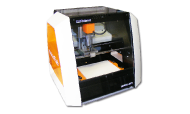
The Roland MODELA has been developed by Roland as a tool primarily for producing 3D models in commercial design studios. In this context the low cost and small footprint allows it to literally sit on a designer’s desktop. Other commercial uses are as diverse as use by architectural modellers and jewellery designers.
There are two models, identical apart from their machining envelope, the MDX-15E (150 x 100 x 60mm) and the MDX-20E (200 x 150 x 60mm).
OK, so MODELAs are essentially compact low cost 3D capable miller/router/engravers. But that is not all, they come complete with an interchangeable scanning head that quickly converts the MODELA to a full 3D contact scanner. Any object placed on the bed can be automatically scanned to produce a full 3D image of it.
MODELAs, then, are probably the most versatile all round machines available at any price. They mill, they rout, they engrave, they model in 3D, and they scan in 3D, not bad for such a low cost machine. |
|
| |
What can I do with a MODELA in school?
Well, the list is endless, but here are a few options:
Milling
Linked to 2D Design they are superb and accurate light milling machines. They will tackle many of the sort of jobs that a heavier machine such as a RotoCAMM would normally do, in materials such as wood, MDF, plastic, etc., (obviously it will take a little longer machining them).
3D Manufacturing
Linked to 3D Design software such as SolidWorks or Pro/DESKTOP, they are the easiest and by far the cheapest way to real output. As well as making 3D models, they are great for producing moulds and plugs for vacuum forming and casting. They are also ideal for direct machining of jewellery items in a range of materials.
Scanning
Small objects (eg., a model “micro car”) can be scanned, scaled up, machined in foam and then vacuum formed. Large objects (eg., a sculpture in clay) can be scanned then, for example, scaled down, machined as a mould in wax, and then a series of personalised buttons for garments could be cast from the mould in resin. Organic forms can be scanned and then imported into software such as SolidWorks, and then modified or incorporated into a 3D CAD model. |
|
|
Milling |
|
| |
|
|
| |
|
PCB work
Linked to PCB Design and Make, a MODELA makes a great PCB manufacturing centre. |
|
|
| |
|
|
 |
| |
Camera Prototype
(TechSoft High Density Foam) |
Engraving Laminate Key Fob
(Flexible Brushed Aluminium on Black) |
| |
|
|
| |
Isolation Engraved PCB
(FR2 PCB Laminate Board) |
Adjustable Mirror
(Slot jointed 3mm FOREX Classic with mirrored acrylic) |
|
|
What about software?
MODELA comes with a windows driver and a range of useful free utilities, but for serious work, extra software is needed. As a minimum we would strongly recommend 2D Design V2. This drives the MODELA directly and will easily manage most users requirements for milling and engraving.
For simple 3D design, 3D Engrave (supplied free) is a useful starting point. It is a 3D design package that is so simple to use, even younger students can create exciting designs. VCarve and PhotoVCarve are also dead easy to use and produce stunning results.
For more sophisticated full 3D designs we recommend SolidWorks. This represents the best balance of power versus ease of use available today, in a full blown solid modelling package.
Whichever solid modelling package you use you will need to load designs into a machining package to drive the machine. Modela Player 4 is supplied with the Modela to do this. Whilst it is a great piece of software, it is possibly too sophisticated for day to day school use. Therefore we recommend Visual Toolpath. This has similar functionality, but is designed to be easy to use in schools.
Finally, don’t forget PCB Design & Make. Simply draw your PCB then engrave it directly onto the copper board.
|
| |
Big Vs Small
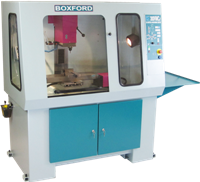
We would all like big powerful machines, and they are certainly something to aspire to (we do our own range of big machines). However in the real world, big is not always beautiful. A big machine costs a lot, and a powerful machine can do a lot of damage (to workpieces, expensive tools and even itself), if something goes wrong. A big machine can also eat expensive materials at a frightening rate (kids will always design things as big as the machine allows, or bigger!). Even a big machine can only do one thing at a time, so while a student is doing a 3D model, no one else can use it for milling or PCB manufacture. Many schools have already opted for the “bums on seats” option and have bought several MODELAs rather than one larger machine. |
| |
Aren’t MODELAs just toys?
Well, some of our competitors like to give that impression, but in reality they are built to the same high standards of all other Roland products. They are designed for commercial use and are rated to run 24 hours a day, 7 days a week. They may be small, and easy to move around, but they have generous machining envelopes. Sure, they are not going to take heavy cuts out of blocks of aluminium, but they can easily deal with most plastics, MDF, hardwood, etc., as well as modelling materials such as foams and waxes. Are they toys then, or are they CAD/CAM’s best kept secret - you decide! |
|
|
|
| |
Roland Modela MDX-15 & MDX-20 |
|
|
|
| |
|
|
|
|
|
|
|
| |
|
|
|
|
| |
ROLAND MODELA MDX-15E
The MDX-15E is now well proven in school use. Its machining envelope is more than adequate for machining a wide range of items, from jewellery work through to larger items such as mobile phones, project cases, etc.
The MDX-15E is ideal as a budget starter machine, or to complement larger machines, (such as RotoCAMM), by using it as, say, a specialist machine for 3D work. Many schools have bought several machines rather than one larger one, to increase student access.
|
|
ROLAND MODELA MDX-20E
Essentially a ”stretched” MDX-15E, the MDX-20E offers exactly twice the working envelope of the smaller machine at far less than twice the cost.
If the budget will stretch, it is well worth upgrading to an MDX-20E to take advantage of the possibilities offered by the larger scanning and milling areas.
|
|
| |
|
|
|
|
| |
FEATURES |
|
|
- Axis travel 150 x 100 x 60mm
- Max. object machinable 150 x 100 x 60mm
- Scan envelope 150 x 100 x 60mm
- Maximum feed rate 15mm/sec
- Spindle speed up to 6500rpm
- Highest scanning resolution 0.05mm
- Probe length 60mm, tip diameter 0.08mm
- Serial interface
- Dimensions 426(W) x 280(D) x 305(H)mm
- Weight 9.6Kg
- 1 year warranty.
UK Mainland & Ireland: Return to Base
Elsewhere: Return and Collect
- TechSoft Education Inset Pack - Inset Course Booklet, CD, Accessories and Materials
|
|
|
FEATURES |
|
|
- Axis travel 200 x 150 x 60mm
- Max. object machinable 200 x 150 x 60mm
- Scan envelope 200 x 150 x 60mm
- Maximum feed rate 15mm/sec
- Spindle speed up to 6500rpm
- Highest scanning resolution 0.05mm
- Probe length 60mm, tip diameter 0.08mm
- Serial interface
- Dimensions 477(W) x 382(D) x 305(H)mm
- Weight 13.7Kg
- 1 year warranty.
UK Mainland & Ireland: Return to Base
Elsewhere: Return and Collect
- TechSoft Education Inset Pack - Inset Course Booklet, CD, Accessories and Materials
|
|
|
| |
|
|
| |
(All prices shown are in pounds sterling and exclude VAT)
|
|
| |
| Roland Modela MDX-15E (inc TechSoft Inset Pack) (View Video) |
1625.00 |
|
| Roland Modela MDX-20E (inc TechSoft Inset Pack) (View Video) |
2195.00 |
|
| N.B. The Modela MDX-15/20E are supplied with a Scanning Head as standard. |
| |
| Recommended tooling: |
| Mixed Tool Pack - 15/20E (General set of tools) (Save £5) |
120.00 |
|
| PCB Tool Pack - 15/20E (Specialist set of tools) (Save £5) |
103.00 |
|
| See also MODELA MDX-15E & MDX-20E Tooling |
| |
| Recommended software: |
| TechSoft 2D Design V2 (2D CAD/CAM Software) |
|
| TechSoft Visual Toolpath Site License |
195.00 |
|
| See also SolidWorks, PCB Design and Make, TechSoft VCarve and PhotoVCarve software. |
|
|
| |
| MODELA ACCESSORIES |
TechSoft can supply the full range of standard accessories for the MODELA. We also stock our own materials, including Rotary Engraving Laminates, Modelling Foam, Modelling Wax, Jelutong, FOREX® classic, PCB Materials and Food Grade Polyethylene. |
|
|
|
| |
|
|
|
|
A free TechSoft Education Inset Pack is supplied with each machine. This includes an Inset Course booklet with “hands-on” tutorials, a tutorial CD, accessories and sample pieces of material. See our TechSoft Inset Pack section for more details.
|
|
| |
|
|
|
|
|